Real stories from people using AIDA64: stress testing, SensorPanel builds, IT fleet management, and fixing common issues.
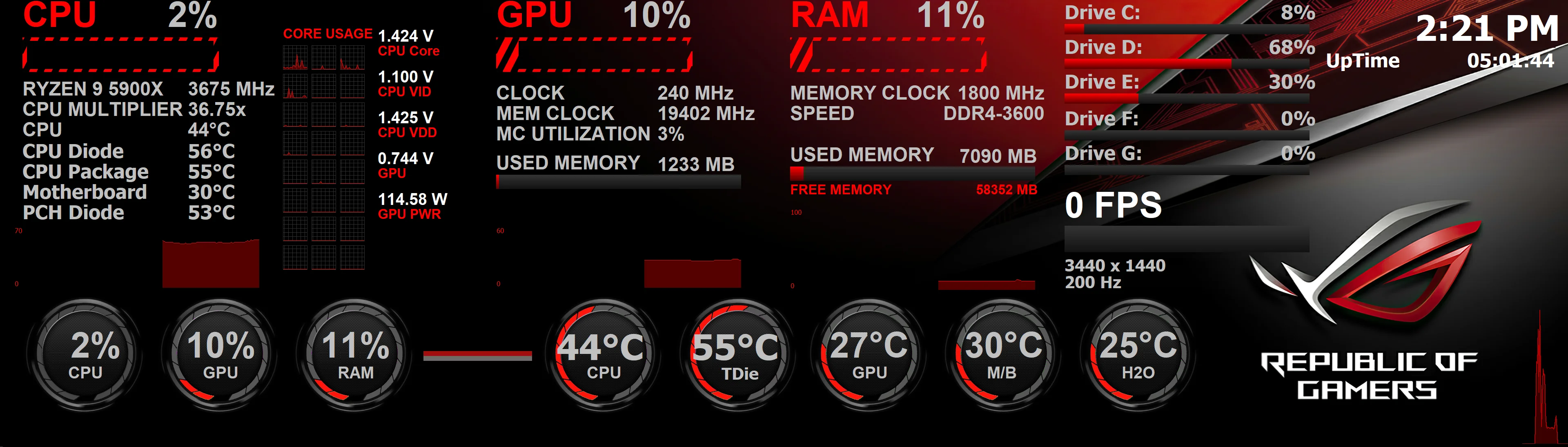
SensorPanel saved my build — and caught a failing PSU
PC enthusiast, USA
I’ve used AIDA64 for years. The SensorPanel alone is worth it. I built a custom overlay that matches my rig: CPU/GPU temps, fan speeds, and voltages. Everything is on a second screen so I can keep an eye on it while gaming.
What really sold me was the stress test. I ran the System Stability Test for a few hours before considering the build “done.” During one run, the 12V rail started dipping and the system eventually shut down. AIDA64 had been logging; we saw the drop. I RMA’d the PSU and the replacement has been rock solid. I’m convinced that test saved me from random crashes later.
Fleet inventory with AIDA64 Business: remote reporting and SQL
IT manager, Europe
We needed a reliable way to know exactly what hardware and software we have across 200+ PCs. We evaluated several tools and chose AIDA64 Business for its depth of data and the way it fits into our workflow.
We run AIDA64 from a network share via logon script. Reports go to a central share and we also push key data into SQL. That gave us a single place to query machines by RAM, disk, OS, or installed software. Remote control is a bonus when we need to check something on a user’s PC without walking over.
The only hiccup was firewall rules: some machines refused remote connections until we allowed the AIDA64 executable. Once we had that documented, rollout was smooth. Support was helpful when we had a question about CSV vs SQL output.
Fixed Corsair iCUE stuttering in 2 minutes (FAQ had the answer)
Builder, UK
After I installed AIDA64, I noticed stuttering in games and sometimes the whole PC would freeze for a second. I thought it was the GPU or drivers. I tried different GPU drivers and power plans — no change.
I eventually searched for “AIDA64 Corsair” and found the official FAQ. It said that Corsair iCUE and AIDA64 can conflict when both try to talk to Corsair hardware (e.g. AIO). The fix was to open AIDA64 → File → Preferences → Stability and disable the Corsair Hydro Platinum and Corsair Link sensor options.
I disabled both, restarted AIDA64, and the stuttering was gone. I still use AIDA64 for everything else; I just don’t use it for Corsair device monitoring. Really glad that was in the FAQ.
Benchmarking and overclocking: CPU and memory validation
Overclocker, Canada
I use AIDA64 Extreme for two things: validating overclocks and comparing before/after. The cache and memory benchmark is great for tuning RAM; the CPU benchmark is consistent enough to see gains from CPU tweaks.
I run the stability test for at least 30 minutes after any change. If it passes and temps are in check (I watch the SensorPanel), I consider the overclock stable for daily use. I’ve also used the GPU stress option to heat up the loop before testing — very useful for custom water cooling.
Network audit without installing on every PC
Sysadmin, Australia
We didn’t want to “install” software on every workstation. The FAQ and manual explained that we could put AIDA64 on a file server and run it from a logon script. We did exactly that: one shared folder, and the script runs \\server\share\aida64\aida64.exe /R \\server\share\reports\$HOSTNAME /AUDIT /CSV /SAFE /SILENT at logon.
We use /SAFE to avoid low-level access issues on odd hardware. Reports are CSV by hostname, so we can diff them over time and see what changed. No install, no GPO deployment of the app itself — just the share and the script. Works great for our size (about 80 PCs).
Activation failed until I ran as Administrator
Home user
I bought a license and typed the key into AIDA64 (installed with the EXE) but it kept saying activation failed. I thought the key was wrong. I found in the FAQ that AIDA64 needs to write pkey.txt and if you’re not admin it can’t. I right-clicked AIDA64 → Run as administrator, entered the key again, and it activated. Simple fix once you know it.
Using AIDA64 to document every PC before refresh
IT coordinator, USA
We refresh 500+ workstations every few years. Before each refresh we run AIDA64 Network Audit from a share, collect HTML reports to a folder by hostname, and keep them for compliance and handover. No install, just a logon script. When we need to know what was in a machine three years ago, we have the report.
We switched from a mix of scripts and manual checks to AIDA64 only. One tool, one format, less training.
SensorPanel on a 5-inch LCD inside the case
Modder, Poland
I mounted a small LCD inside the side panel and connected it via USB. AIDA64 SensorPanel outputs to it. I see CPU/GPU temps, fan speeds without any overlay on the game. Looks clean and is super useful for long sessions.
Stability test found bad RAM in minutes
Gamer, Spain
My PC was randomly blue-screening. I ran AIDA64 System Stability Test with only stress system memory. Within five minutes I got a hardware failure. Swapped the RAM stick and the errors followed the stick. RMA'd it; new stick has been fine.
Comparing laptop before and after repaste
Laptop user, India
I repasted my gaming laptop and wanted to see if it made a difference. I ran AIDA64 stress test for 15 minutes before and after repaste. Max CPU temps dropped by 12°C. I used the HTML report to show before/after. Simple and convincing.
Remote monitoring of a home server
Homelab admin, Netherlands
I run AIDA64 Business at home. My server runs AIDA64 with /ACCEPTBG so I can connect from my main PC. I check CPU, disk temps, and fan speeds without walking to the server rack. If something looks off I get an alert and then connect to investigate.
Why we chose AIDA64 over Spiceworks and others
IT manager, UK
We needed inventory that could run without a full agent and push to SQL. AIDA64 Business gave us the deepest hardware and software detail, the lightest footprint (run from share), and direct SQL insert. No cloud dependency. We run it from a single share and logon script; reports and SQL are updated daily.
PCI scan hang fixed with AIDA64.INI
User, Italy
AIDA64 would freeze at Scanning PCI devices on my workstation. I created AIDA64.INI with LowLevelPCI=0. Restarted AIDA64 and it completed the scan. I don't get low-level PCI details now, but I get everything else.
Reporting BIOS and driver versions at scale
Sysadmin, Australia
We use AIDA64 Business CSV reports to list every PC's BIOS version and main driver versions. We import into a spreadsheet and filter for outdated BIOS or drivers. Then we target those machines for updates. Saved us from blindly updating everything.
False positive from antivirus — resolved
User, Germany
My antivirus quarantined an AIDA64 driver. I excluded the AIDA64 folder, restored the file, and AIDA64 worked again. I reported the false positive to the vendor; they fixed it in an update. If your AV flags AIDA64, exclude the folder and report it.
Benchmarking for YouTube content
Content creator, USA
I use AIDA64 CPU and memory benchmarks in every build guide and comparison video. Results are consistent. I also run the stability test at the end of each build to show the system is stable. The HTML report is great for thumbnails and descriptions.
SMART warning saved my data
User, Canada
AIDA64 showed a SMART warning on one of my drives (reallocated sectors increasing). I backed up immediately and replaced the drive. A week later the old drive started failing. Without AIDA64 I might have lost data. I now check the Storage SMART page regularly.
Using AIDA64 Engineer as a field tech
Field technician, USA
I have AIDA64 Engineer on my USB toolkit. At customer sites I run it to get a full hardware and software report in under a minute. I save HTML to the USB for documentation and driver lookup. One license, unlimited PCs — perfect for a tech who visits many machines.